

If you’ve come across the name InstaPV before, PVStory is its new identity. The platform moved to pvstory.com in early 2026 and continues offering the same core service under a new name.
PVStory is a web-based tool that lets you browse public Instagram profiles anonymously, without logging in or alerting the account owner. No app, no account, and no Instagram credentials are required.
This guide covers everything you need to know about PVStory, including its features, how to use it, its limitations, and whether it is safe to use.
What is PVStory?
PVStory is a web-based, third-party Instagram viewer that lets you explore public Instagram profiles directly through a browser. There is nothing to install and no account to create.
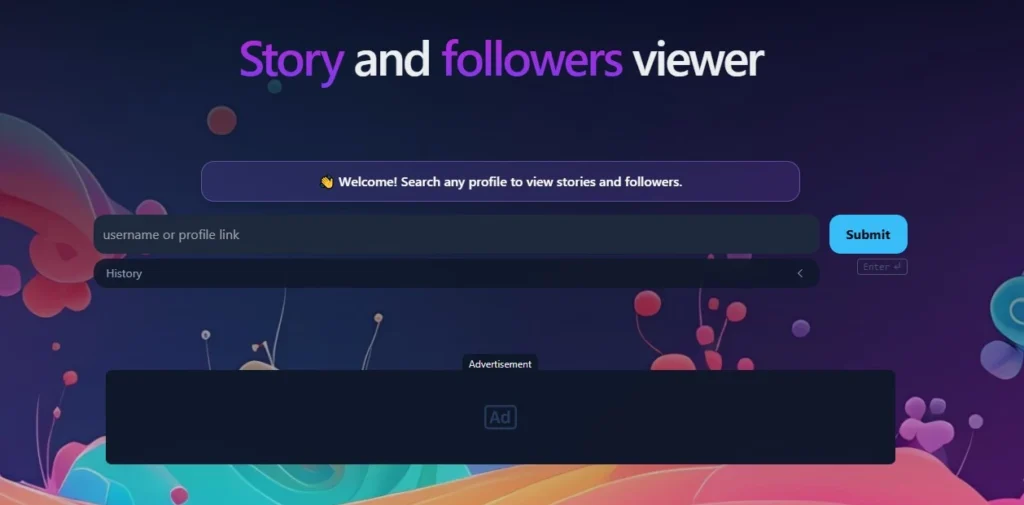
You simply enter a public Instagram username, and PVStory retrieves that profile’s available content, including stories, posts, reels, highlights, tagged content, and basic profile information.
It is worth noting that PVStory only works with public accounts. If a profile is set to private, the tool cannot access it. This is not a workaround for private Instagram content, it is purely a viewer for what is already publicly visible.
Why Is PVStory Appearing for InstaPV Searches?
PVStory and InstaPV are actually the same platform. InstaPV operated at instapv.com for years before rebranding and moving to pvstory.com in February 2026. The domain change was announced directly on the platform due to circumstances the team described as beyond their control.
If you have been searching for InstaPV and keep landing on PVStory, you are in the right place. The features, functionality, and community are all the same, just under a new name and domain.
One thing worth noting: a separate site called Story PV (instapv.works) also appears in these searches, but it is not the same platform.
Key Features of PVStory
- Anonymous Story Viewing: Watch active stories on public profiles without appearing in the viewer list. The account owner receives no notification.
- Story Highlights: Browse saved highlight collections on any public profile without logging in.
- Posts, Reels, and Tagged Content: Access feed posts, short-form reels, and tagged posts from one interface, useful for spotting collaborations and brand mentions.
- Chronological Engagement Insights: Likes and comments are displayed in chronological order, so you can see how engagement develops over time on any post.
- Follower and Following Lists: View who follows an account and who they follow, sorted chronologically to track recent connections and growth patterns.
- Profile Overview: See bio, profile picture, follower count, following count, and post count without an Instagram account.
- Post Likes Viewer: A recently added feature that shows who liked a post in chronological order, something Instagram’s own interface does not make easy.
- Content Download: Save stories and posts directly to your device for offline use.
- Cross-Device Access: Works on desktop, tablet, and mobile through any standard web browser, no app needed.
Who Can Use PVStory?
PVStory is built for anyone who needs to view public Instagram content without being logged in or identified. Common use cases include:
- Marketers and brand managers researching competitor content strategies without tipping them off
- Content creators drawing inspiration from public profiles anonymously
- Journalists and researchers monitoring public accounts for reporting or academic work
- Parents keeping an eye on public accounts their children interact with
- Casual users who simply want to browse public profiles without an Instagram account
How Does PVStory Work?
PVStory fetches publicly available Instagram data through its own backend, without involving your personal account at any point. The process is straightforward:
- Go to pvstory.com
- Enter a public Instagram username in the search bar
- PVStory retrieves available content for that profile
- Browse stories, posts, reels, highlights, and engagement data in your browser
No login, no app, and no Instagram credentials are required at any step. Private accounts cannot be accessed regardless of what you enter, as Instagram’s own privacy settings block that content at the source.
Is PVStory Safe to Use?
PVStory does not ask for your Instagram password, which removes the biggest risk associated with third-party viewers. It only accesses content that is already publicly visible, so there is no exposure to private data on either end.
That said, there are real considerations worth understanding:
- IP and browser tracking: Even tools that do not ask for credentials can log your IP address or browser fingerprint. PVStory’s privacy policy should be reviewed before regular use.
- Ad networks: Free tools in this category are typically ad-supported. Be cautious of aggressive redirects or pop-ups, which are signs of low-quality ad networks.
- Copycat sites: After the domain change to pvstory.com, several fake imitation sites appeared. Only use the official domain.
- Instagram’s terms of service: Using third-party viewers technically falls outside Instagram’s terms. This carries no legal risk for casual users viewing public content, but it is worth knowing.
Pros and Cons of PVStory
Pros
- Fully anonymous, no viewer notifications sent to the profile owner
- No Instagram account or login required
- Covers stories, highlights, posts, reels, tagged content, and post likes
- Chronological engagement and follower insights not easily available on Instagram itself
- Works across all devices through a browser
- Free to use for core features
Cons
- Only works on public accounts, private profiles are completely inaccessible
- Cannot interact with content, no likes, comments, follows, or messages
- Reliability can be inconsistent since Instagram actively works to limit third-party scrapers
- Some engagement metrics may be estimates rather than exact figures
- Ad-supported, which can mean intrusive ads depending on the session
- No official mobile app, any app claiming to be PVStory on the App Store or Play Store is a third-party clone
- Use falls outside Instagram’s terms of service
Best PVStory Alternatives
If PVStory is down or you want a backup option, these are the tools most actively used in 2026 for the same purpose:
- StoriesIG: Currently the most-used anonymous Instagram viewer by search volume, pulling over 353,000 weekly impressions. Covers stories, highlights, posts, and reels. Fast and reliable but ad-heavy on desktop.
- AnonyIG: The second most-searched option with over 183,000 weekly impressions. Cleaner mobile experience than StoriesIG and also handles tagged photos and profile browsing.
- InstaNavigation: A browser-based viewer covering stories, reels, highlights, and public profiles. Solid fallback option.
- DolphinRadar: Offers free anonymous story and highlight viewing with no daily limits. Also includes paid tracking features for users who need ongoing monitoring of specific accounts.
One important note: no third-party tool can access private Instagram accounts, regardless of what the website claims. If a tool promises otherwise, that is a red flag.
Conclusion
PVStory is a capable, no-login tool for browsing public Instagram content anonymously. The rebranding from InstaPV has not changed what it does, and the core experience, including story viewing, engagement insights, follower tracking, and content downloading, remains intact.
Its main limitations are consistent with the entire category: private accounts are off-limits, reliability fluctuates when Instagram updates its defenses, and the ad experience can be intrusive on free tiers. For what it is designed to do, it works. Just stick to the official domain at pvstory.com, and keep a backup viewer handy for when the service goes down.
Frequently Asked Questions
Yes, the core features are free to use. No subscription is required for basic anonymous browsing.
No. You can access all public content without creating or connecting any Instagram account.
No. Private profiles are protected by Instagram’s own settings. No third-party tool can bypass this.
Yes. PVStory is the rebranded version of InstaPV. The platform moved from instapv.com to pvstory.com in February 2026. The features and functionality remain the same.
No. PVStory does not trigger Instagram’s viewer notifications. The account owner has no way of knowing you accessed their public content through the tool.
