


Building a strong online presence is important for any business, and a Google My Business profile plays a key role in making that happen. It helps your business appear across Google Search and Maps, making it easier for potential customers to find and connect with you.
With the right setup, you can manage customer reviews, share important business information, and even get insights on calls, reviews, and bookings. This guide will walk you through how to set up your profile step by step, including how to request access to an existing business profile if it already represents your business.
What is Google My Business?
Google My Business (GMB) is a free tool provided by Google that allows businesses to manage their online presence across Google Search and Google Maps. By creating a GMB listing, businesses can display essential information such as their address, phone number, website, hours of operation, and customer reviews.
It also enables businesses to post updates, share photos, and engage directly with customers.
Essentially, GMB acts as a digital storefront, helping potential customers find your business, learn about your offerings, and make informed decisions, all while boosting your visibility in local search results.
Why Creating a Google My Business is Beneficial
Creating a Google My Business (GMB) profile offers numerous advantages for businesses looking to grow their online presence and connect with local customers.
Here’s why it’s so valuable:
1. Boosts Local SEO and Visibility
A GMB listing significantly improves your chances of appearing in local search results and on Google Maps. When users search for products or services near them, having an optimized GMB profile helps your business stand out, attracting more potential customers.
2. Increases Customer Engagement
GMB allows businesses to interact directly with customer reviews, Q&A, and messaging. Prompt responses to inquiries and reviews foster trust, improve customer relationships, and encourage repeat business.
3. Provides Key Insights and Analytics
Google My Business offers valuable data about how customers find your business, including search queries, views, clicks, and direction requests. These insights help you make informed decisions to improve marketing strategies and customer experience.
4. Showcases Your Business Effectively
With photos, videos, posts, and business descriptions, GMB lets you highlight your products, services, and unique selling points. A visually appealing and informative listing can influence customer decisions and enhance brand credibility.
5. Cost-Effective Marketing Tool
GMB is free to use, making it an affordable yet powerful way to promote your business online. Compared to paid advertising, it offers sustainable long-term benefits by improving visibility and driving organic traffic.
How to Set Up Google My Business? Step-by-Step Process:
Setting up Google My Business is straightforward, but following each step carefully ensures your listing is accurate and optimized.
Here’s a detailed walkthrough:
Step 1: Sign in to Google My Business
- Open your browser and go to Google My Business.
- Click the “Start now” button at the top-right corner.
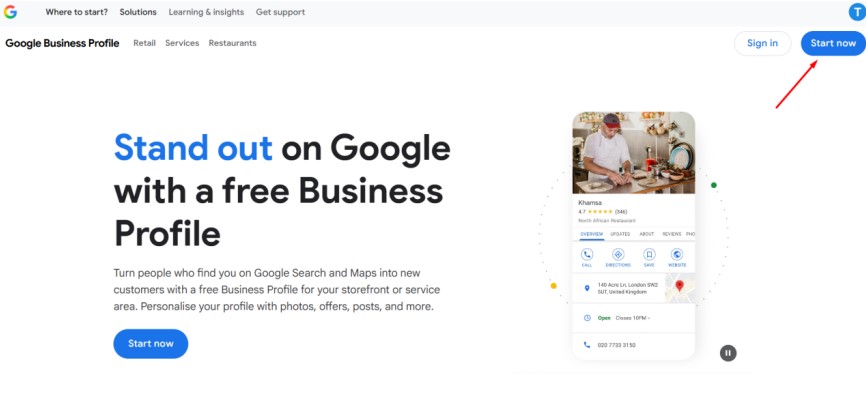
- Sign in with your Google account. If you don’t have one, click “Create account” and follow the prompts.
Step 2: Add Your Business
- Now, add your business details, such as name and category. (e.g., “Bakery,” “Plumber,” “Digital Marketing Agency”).
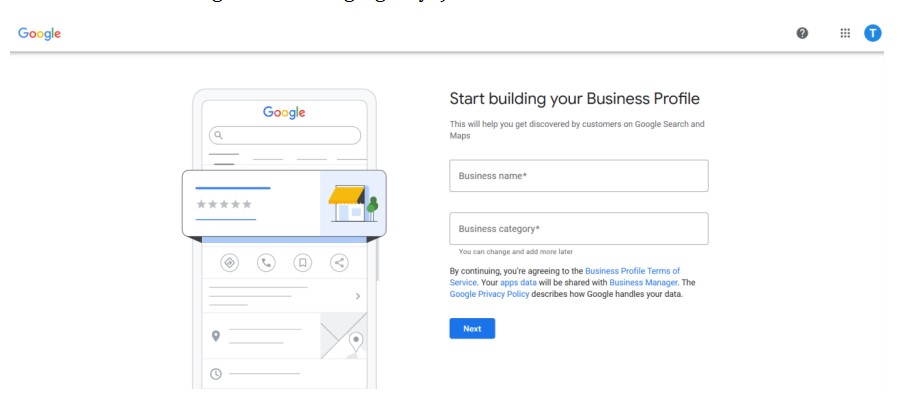
- Google will use this category to match your business with relevant searches, so choose carefully.
Step 3: Add Location Details
- If you have a physical location, select “Yes” and enter your business address.
- If you serve customers at their locations (like a delivery or service business), select “No” and specify your service areas.
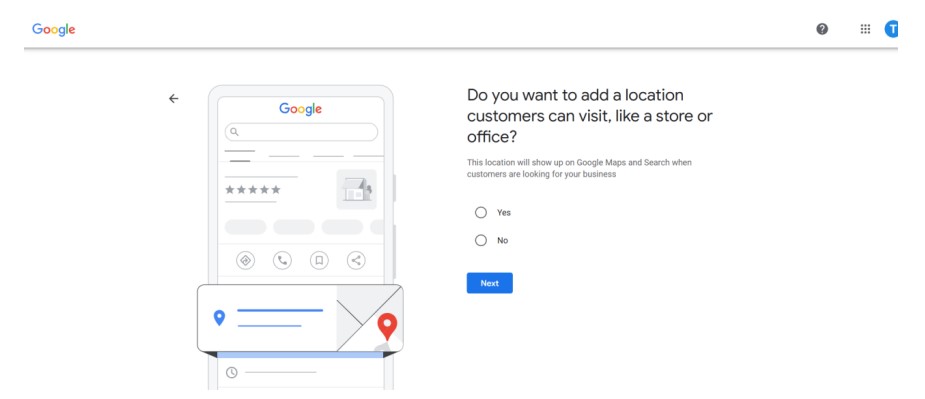
- Confirm the placement of your location on Google Maps for accuracy.
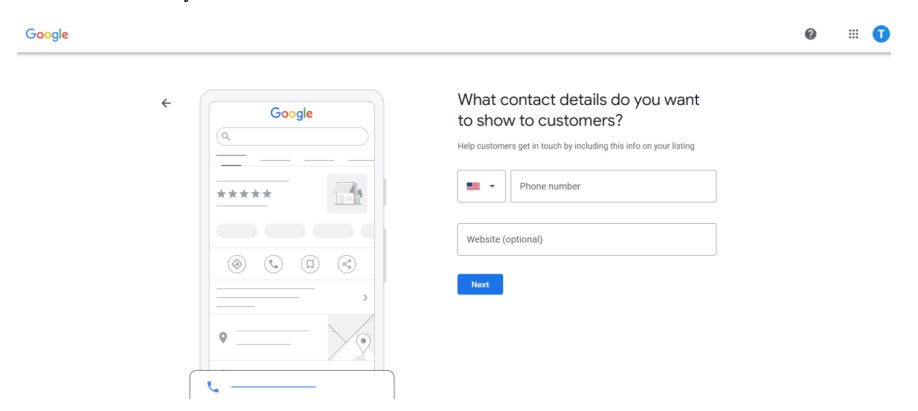
Step 5: Enter Contact Information
- Add your business phone number and website URL.
- Ensure the phone number is active and monitored regularly, as customers will use it to contact you.
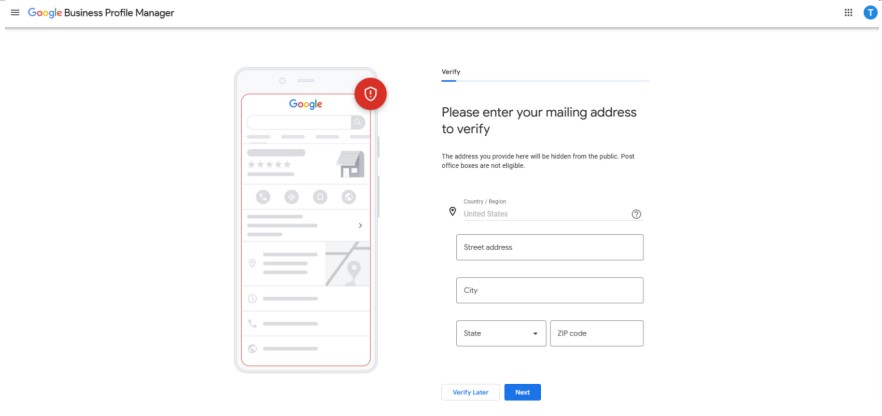
Step 6: Verify Your Business
- Now, complete the verification procedure (you can verify later as well).
Step 7: Add Business Hours
- Specify your regular hours of operation.
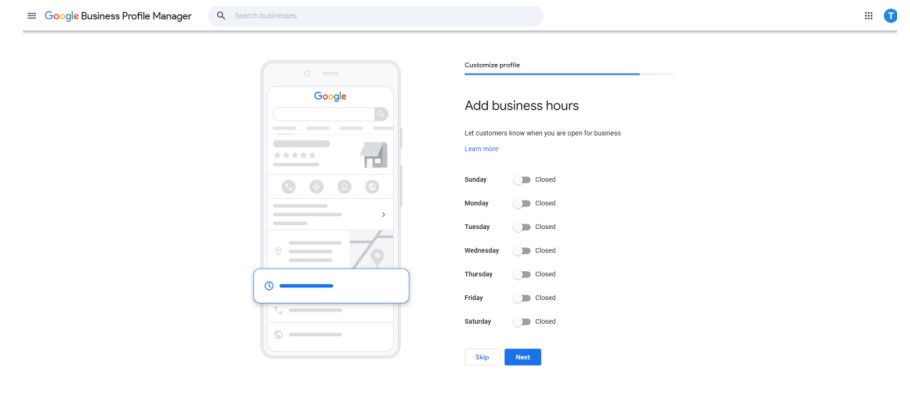
- Include special hours for holidays or seasonal changes to avoid misleading customers.
- Add business description.
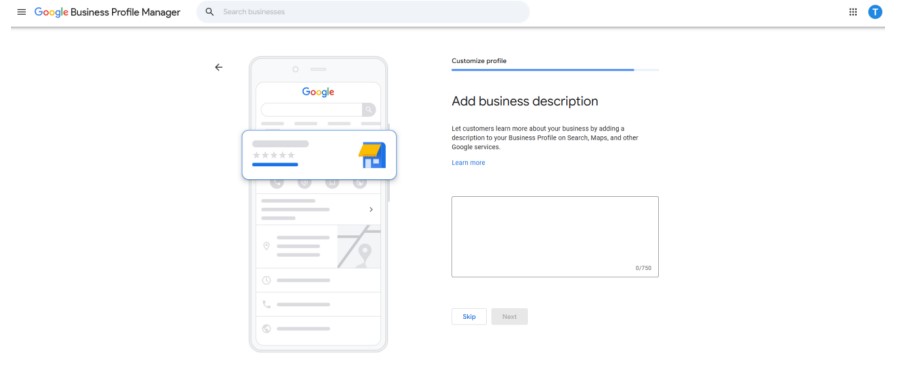
Step 8: Add Photos and Videos
- Upload high-quality photos of your storefront, products, team, and services.
- Videos (30 seconds or less) can give customers a virtual tour or highlight special features.
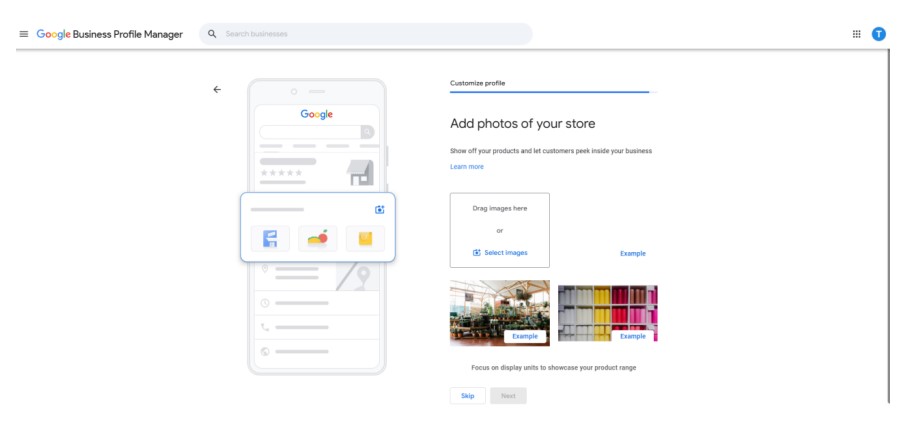
- Visual content increases engagement and builds trust.
Step 9. Finalize:
- Now, finalize the profile creation by clicking on “Continue.
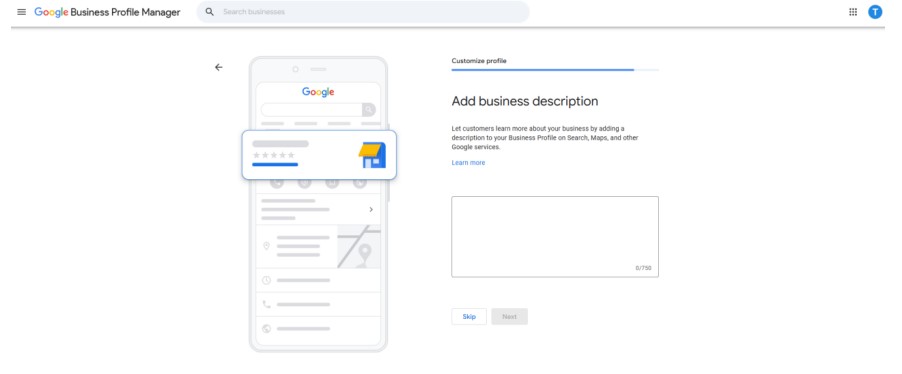
- Your profile will be visible on GMB after verification.
What to Do If Your Business Is Already on Google
If your business is already listed on Google, there’s no need to create a new profile. Instead, you should claim or request ownership of the existing listing so you can manage it properly.
Start by searching your business name on Google Search or Maps. If a profile appears, look for an option like “Own this business?”. This is the prompt Google shows when a listing has not yet been claimed.
Clicking it will begin the verification process to confirm that you are the rightful owner. In some cases, the profile may already be managed by someone else, such as a previous owner, employee, or agency. If that happens, you can request access, and Google will notify the current profile manager. Once access is granted, you’ll be able to update your business details, respond to customer reviews, and view insights such as calls, reviews, and bookings. Managing the profile ensures your information stays accurate and helps you better connect with customers.
How to Optimize Your Google Business Listing
Optimizing your Google Business listing helps your profile appear in relevant searches, attract more customers, and improve how people interact with your business on Google Search and Maps.
Once your profile is set up and verified, the next step is making sure it is fully optimized for visibility and engagement.
Complete and Accurate Business Information
Start by ensuring all your basic details are filled out correctly. This includes your business name, address, phone number, website, and operating hours. Consistency is important because your information should match what appears on your website and other platforms. Incomplete or inconsistent details can reduce trust and affect visibility.
Choose the Right Business Categories
Selecting the correct primary and secondary categories helps Google understand what your business offers. Your primary category should describe your main service, while additional categories can cover related services. This directly impacts how often your profile appears in relevant searches.
Write a Clear Business Description
Your business description should explain what you do in a simple and natural way. Focus on your services, what makes your business unique, and who you serve. Avoid keyword stuffing because clarity and relevance matter more than repetition.
Add High-Quality Photos
Photos play a major role in attracting attention. Upload clear images of your storefront, interior, products, or services in action. Businesses with photos usually get more engagement because they appear more trustworthy and professional.
Manage Customer Reviews
Customer reviews influence both ranking and user trust. Encourage satisfied customers to leave reviews and make sure you respond to them regularly. Engaging with reviews, whether positive or negative, shows that your business is active and customer focused.
Use Insights to Improve Performance
Google Business Profile provides insights such as how customers find you, how many people call your business, and how often your listing appears in search and maps. Use this data to understand what is working and where you can improve visibility and engagement.
Final Thoughts:
Setting up and optimizing Google My Business is a crucial step for any business looking to enhance its online presence and attract local customers. By following the steps outlined in this guide, you can create a professional, engaging, and accurate listing that boosts visibility, builds credibility, and encourages customer interaction.
Regularly updating your profile and leveraging GMB’s features ensures your business stays relevant, competitive, and easy to find in local search results.
