

If you manage a website, you have probably run into both of these terms while trying to control what search engines show in results. Robots.txt and noindex sound similar since both deal with search engine bots, but they do very different jobs.
Mixing them up can accidentally keep your most important pages out of Google entirely, or leave private pages exposed.
This guide breaks down what each one does, when to use them, and how they work together (or against each other) so you can make the right call for your site.
Robots.txt vs Noindex at a Glance
Before getting into the details, here is the short version.
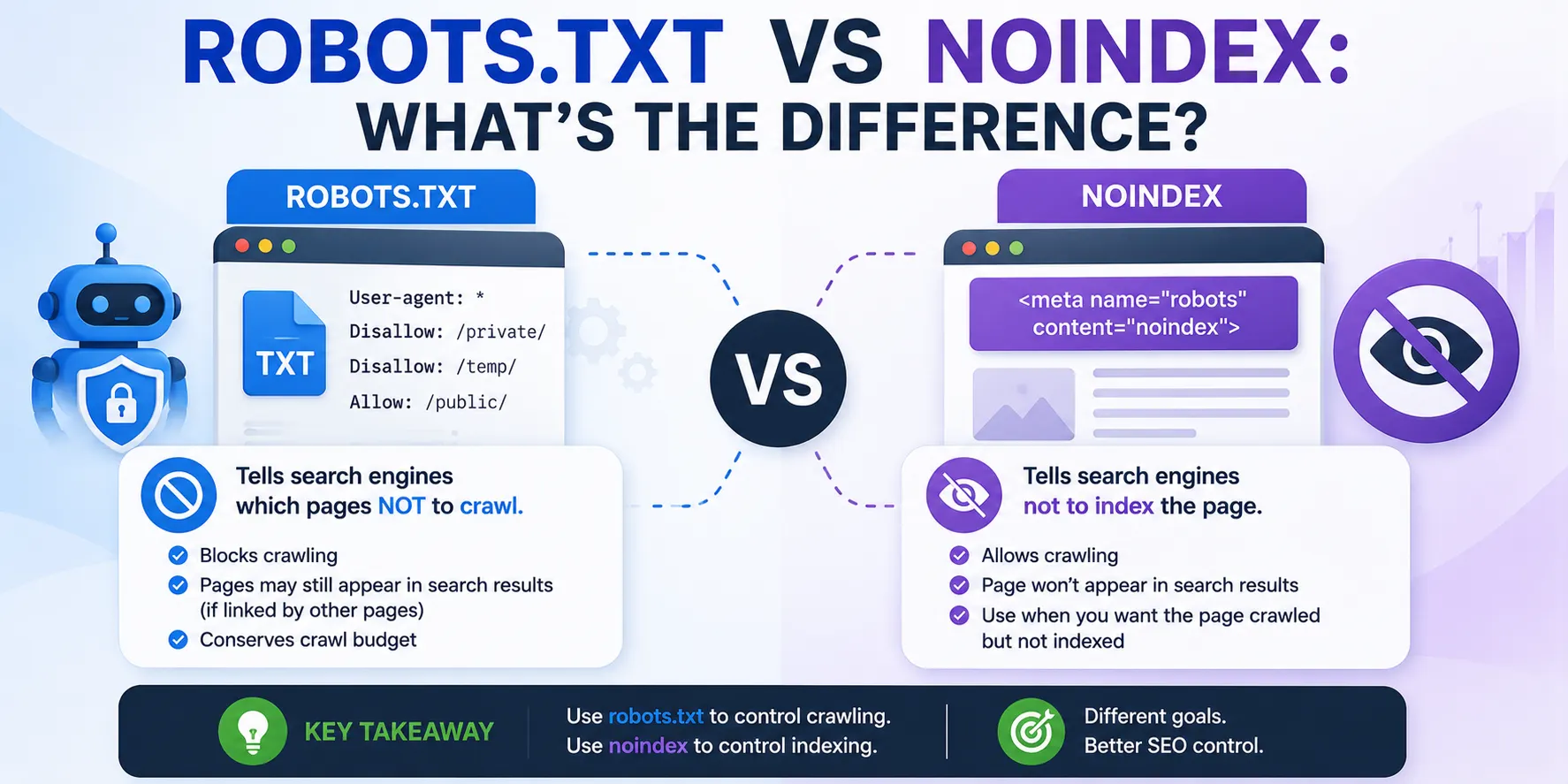
- Robots.txt controls crawling. It tells search engine bots which parts of your site they can or cannot visit.
- Noindex controls indexing. It tells search engines a page can be crawled, but it should not be shown in search results.
- A page blocked by robots.txt can still appear in search results as a bare URL, just without a description.
- A page with noindex will not appear in search results at all, as long as bots are able to crawl and read that tag.
The key distinction is crawling versus indexing. Robots.txt manages access. Noindex manages visibility. Confusing the two, or using them together carelessly, is where most SEO issues with this topic start.
What Is Robots.txt?
Robots.txt is a plain text file that sits in your website’s root directory (for example, yoursite.com/robots.txt). It acts as a set of instructions for search engine crawlers, telling them which directories or files they are allowed to access and which ones they should skip.
How Robots.txt Works
When a crawler like Googlebot visits your site, it checks the robots.txt file first before crawling anything else. Based on the rules inside, it decides which URLs to request and which to leave alone.
This file governs crawl behavior only. It has no power over whether a page gets indexed once it is found through other means, such as an external link.
Robots.txt Syntax: User-agent, Allow, Disallow
Robots.txt rules are built using a few simple directives:
- User-agent: specifies which crawler the rule applies to. An asterisk (*) means the rule applies to all bots.
- Disallow: tells the specified user-agent which directories or pages it should not crawl.
- Allow: grants crawling permission to a specific file or subdirectory, often used to create an exception within a disallowed folder.
Example Robots.txt File
A typical WordPress robots.txt file looks like this:
[CODE]
User-agent: *
Disallow: /wp-admin/
Allow: /wp-admin/admin-ajax.php
[/CODE]
This tells all crawlers to stay out of the wp-admin directory, except for the one file needed to keep certain site functions running.
What Is a Noindex Tag?
A noindex tag is an instruction that tells search engines not to include a specific page in search results. Unlike robots.txt, which works at the file or directory level, noindex operates on individual pages.
How Noindex Works
For noindex to function, a search engine first needs to crawl the page and read the instruction. Once it does, it excludes that page from search results, even if other pages link to it. If the page was already indexed, Google will eventually remove it after recrawling.
Ways to Implement Noindex
There are two reliable ways to apply a noindex directive:
- Meta robots tag, placed in the <head> section of an HTML page:
[CODE]
<meta name=”robots” content=”noindex”>
[/CODE]
- X-Robots-Tag HTTP header, useful for non-HTML files like PDFs, since there is no <head> section to place a meta tag in:
[CODE]
x-robots-tag: noindex
[/CODE]
It is worth noting that a “Noindex:” line inside the robots.txt file itself was once used informally by some site owners.
Google officially stopped supporting this in September 2019, so it should not be relied on today. The meta tag or HTTP header are the only dependable methods.
Robots.txt vs Noindex: The Core Difference
The simplest way to think about this is that robots.txt deals with access and noindex deals with visibility. Crawling is the process of a bot finding and reading your pages. Indexing is the process of storing that page’s content in the search engine’s database so it can show up in results.
Robots.txt can stop a bot from ever reading a page. Noindex allows the bot to read the page, but instructs it not to store or display that page in search results. This is exactly why combining the two incorrectly causes problems, which we will cover shortly.
When to Use Robots.txt
Robots.txt makes sense when you want to manage how crawlers spend their time on your site, rather than controlling what shows up in results. Good use cases include:
- Blocking crawlers from admin areas, login pages, or internal scripts that offer no value to searchers.
- Preventing bots from wasting crawl budget on low-value or duplicate sections of a large site.
- Keeping crawlers away from internal search result pages or filtered/faceted URLs that generate near-infinite variations.
- Pointing crawlers toward your sitemap and prioritizing the pages that matter most.
The limitation to remember is that disallowing a page in robots.txt does not guarantee it stays out of search results. If another site links to that page, Google may still display the URL, just without a title or description pulled from the page itself.
When to Use Noindex
Noindex is the right tool when you are fine with a page being crawled, but you do not want it showing up in search results. Common situations include:
- Thank-you pages or order confirmation pages that have no value to someone searching.
- Duplicate or near-duplicate content where you want to keep one version out of competition with another.
- Internal search result pages that are useful to visitors but irrelevant to search engines.
- Temporary landing pages, seasonal promotions, or staging content not meant for public discovery.
- Author archive pages or thin content pages that add little SEO value on their own.
The catch with noindex is that it only works if the page can actually be crawled. If a bot cannot reach the page, it cannot see the noindex instruction either, which brings us to the most common mistake people make with these two directives.
Why You Should Never Combine Disallow and Noindex on the Same Page
This is the single most important rule to understand, and it is one that Google’s own Martin Splitt has addressed directly. If you disallow a page in robots.txt and also add a noindex tag to that same page, the noindex tag becomes useless.
Here is why. Once a page is disallowed, crawlers never request it, which means they never see the noindex instruction sitting in its code. As a result, the page can still get indexed, particularly if other sites link to it, just with no snippet or description in the search result.
In Google Search Console, this situation typically shows up as “Submitted URL blocked by robots.txt” in the Page Indexing report. If you want a page completely out of search results, the correct approach is to use noindex alone and make sure robots.txt is not blocking that page.
Robots.txt vs Noindex vs Canonical Tags
Canonical tags add a third layer to this picture. While robots.txt and noindex control whether a page is crawled or shown in results, a canonical tag tells search engines which version of similar or duplicate content should be treated as the “main” one for ranking purposes.
If you are dealing with duplicate content, it is common to combine a canonical tag on the duplicate page (pointing to the original) instead of, or alongside, noindex. The important detail is that for a canonical tag to be respected, the page still needs to be crawlable. If you disallow the page in robots.txt, Google cannot see the canonical tag any more than it can see a noindex tag, and link equity from that page may not consolidate properly with the original.
Special Cases for Robots.txt and Noindex
A few scenarios do not fit neatly into the standard advice above, and they trip up even experienced site owners.
Non-HTML Files (PDFs, Images, Videos)
Both robots.txt and noindex affect more than just HTML pages. Files like PDFs, images, and videos can also be blocked from crawling or excluded from indexing. Since these files do not have an HTML <head> section, the X-Robots-Tag HTTP header is the only way to apply noindex to them directly.
JavaScript-Rendered Pages and API Responses
Modern websites often rely on JavaScript to pull in content from an API after the page loads. If that API endpoint is disallowed in robots.txt, the crawler cannot fetch the data needed to render the page properly, even if the page itself is fully indexable.
This can result in incomplete or broken-looking pages in Google’s index. In these cases, it is usually safer to leave API paths crawlable and apply noindex selectively elsewhere, rather than disallowing the API route outright.
AI Crawlers and Robots.txt
Beyond traditional search engines, a growing number of AI crawlers, such as those used by large language model providers, also respect robots.txt directives.
Site owners now commonly add separate user-agent rules to control whether these AI crawlers can access and use their content, separate from rules aimed at Googlebot or Bingbot. This is a newer layer of crawler governance worth factoring into your robots.txt strategy.
How to Check and Test Robots.txt and Noindex
Google Search Console offers a few free tools that make it easy to confirm these directives are working as intended.
- Robots.txt report: shows how Google reads your robots.txt file and flags any errors or warnings.
- URL Inspection tool: lets you check a specific URL to see whether it is blocked by robots.txt, whether a noindex tag is present, and how Google last crawled it.
- Page Indexing report: tracks which pages are indexed, excluded, or blocked, including the “Submitted URL blocked by robots.txt” status mentioned earlier.
Running pages through these tools after making changes helps confirm you are getting the outcome you actually want, rather than assuming the directive worked.
Robots.txt vs Noindex: Quick Decision Guide
A simple way to decide between the two:
- Want to save crawl budget or block bots from low-value sections entirely? Use robots.txt.
- Want a page to stay out of search results, but still be readable by bots? Use noindex.
- Need to manage duplicate content? Use a canonical tag, with noindex as backup if needed.
- Need to protect genuinely sensitive data? Use neither. Use password protection or server-level access controls instead.
Common Mistakes to Avoid
- Disallowing a page in robots.txt while also adding a noindex tag to it, which prevents the noindex tag from ever being seen.
- Treating robots.txt as a security measure. It does not hide sensitive content; it is a publicly accessible file, and well-behaved bots are the only ones that respect it.
- Blocking an entire directory by accident, which can unintentionally remove large sections of a site from search visibility.
- Forgetting that disallowed pages can still appear as bare URLs in search results if linked from elsewhere.
- Relying on the old “Noindex:” line inside robots.txt, a method Google no longer supports.
Conclusion
Robots.txt and noindex solve different problems. Robots.txt manages what bots can crawl, while noindex manages what shows up in search results. Used correctly, they work together to guide search engines efficiently.
Used incorrectly, especially when combined on the same page, they can quietly undo each other and leave your SEO results worse off than if you had done nothing at all.
FAQs
Does robots.txt stop a page from appearing in Google search results?
Not on its own. A disallowed page can still show up as a bare URL if other sites link to it, just without a title or description.
Can I use noindex and disallow on the same page?
You can, but you shouldn’t. If the page is disallowed, Google never sees the noindex tag, so the page may still get indexed.
Is robots.txt a good way to hide sensitive information?
No. Robots.txt is a publicly accessible file and is not a security measure. Use password protection for anything genuinely sensitive.
How do I noindex a PDF or image file?
Since these files have no HTML head section, you need to use the X-Robots-Tag HTTP header instead of a meta tag.
Does Google still support the “Noindex:” line inside robots.txt?
No. Google officially stopped supporting this method in September 2019, so it should not be used anymore.
