

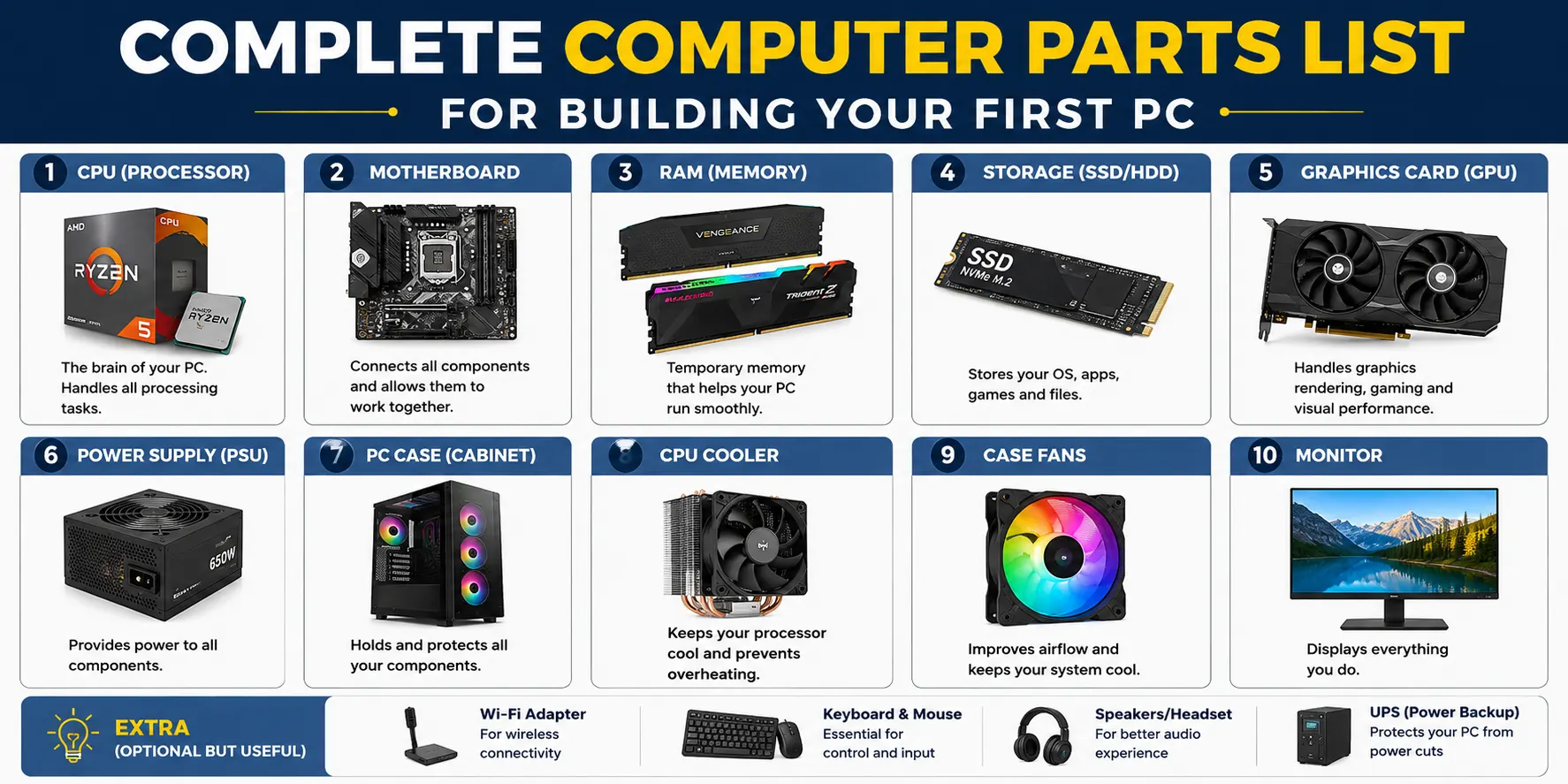
Building your first PC can feel overwhelming at first glance, but it becomes straightforward once you understand what each part does. Every component has a specific role, and they all work together to make the system function.
This guide breaks down the complete computer parts list you need, explains what each component does, and helps you make informed decisions before you spend a single rupee.
Whether you’re building for everyday use or something more demanding, knowing the basics puts you in control.
The Core Components Every PC Needs
These are the non-negotiables. Without these parts, the system simply won’t turn on.
Processor (CPU)
The CPU is the brain of your PC. It handles instructions and determines overall performance. Most builders start here because the CPU dictates which motherboard you can use, which shapes the rest of the build.
Motherboard
The motherboard is the central hub that connects every component. Compatibility between the CPU and motherboard is critical since not all combinations work together. Always confirm this before purchasing either part.
RAM (Memory)
RAM allows your system to handle multiple tasks at once. Without enough of it, even a powerful processor will feel sluggish during everyday use. For most builds today, 16GB is a solid starting point.
Storage
Storage holds your operating system, applications, and files. Faster storage means quicker load times and a more responsive system overall. Many builds use two drives: a fast one for the OS and a larger one for general files.
Power Supply Unit (PSU)
The PSU delivers electricity to every component in your system. It needs to provide enough power for stable operation without being unnecessarily oversized. This is one area where quality should not be compromised.
PC Case
The case houses everything and plays a bigger role than most first-time builders expect. It affects airflow, ease of assembly, and cable management. A well-designed case makes the entire build process smoother.
Do You Need a Dedicated GPU?
Not every build requires a dedicated graphics card. Many processors come with integrated graphics that handle everyday tasks like browsing, streaming, and office work without any issues.
A dedicated GPU becomes necessary when you’re gaming, editing video, or running visually demanding applications. It takes over graphics processing from the CPU and handles it far more efficiently. This is often the most expensive component in a gaming or creative build, but also one of the most impactful.
Cooling: Why It’s More Important Than It Looks
Every component generates heat during use. Without adequate cooling, your PC will throttle its performance to protect itself, which means slower speeds during longer sessions.
Most CPUs come bundled with a stock cooler. For entry-level or mid-range builds, this is usually sufficient. Higher-performance builds may benefit from an aftermarket cooler to maintain stable temperatures under load.
Beyond the CPU cooler, airflow through the case matters too. A case with good ventilation keeps all components running cooler, which supports long-term reliability.
Storage Options: Speed vs. Capacity
Storage decisions come down to two factors: speed and capacity.
SSDs (Solid State Drives) are significantly faster than traditional HDDs and make the biggest difference in everyday responsiveness. HDDs offer more storage at a lower cost per gigabyte, making them useful for bulk file storage.
A common and practical setup for first-time builders:
- SSD for the operating system and frequently used programs
- HDD for photos, videos, and general file storage
This combination gives you both speed and space without pushing the budget unnecessarily.
Choosing the Right Power Supply
The PSU is easy to overlook, but it’s one of the most important decisions in your build. An underpowered PSU can cause instability, unexpected shutdowns, and in some cases, damage to other components.
When choosing a PSU, look for one that covers your system’s total power draw with some headroom to spare. Efficiency ratings like 80 Plus Bronze, Gold, or Platinum indicate how reliably the unit converts power. A quality PSU from a reputable brand is always worth the investment.
Compatibility: The Factor That Ties Everything Together
Compatibility is what separates a working build from a frustrating one. Every component must physically fit, connect correctly, and work within the same power and performance ecosystem.
The most common compatibility checks for first-time builders:
- CPU and motherboard must share the same socket type
- RAM type and speed must be supported by the motherboard
- The case must fit the motherboard form factor (ATX, Micro-ATX, etc.)
- The PSU must meet the total power requirements of the system
Running through this checklist before purchasing saves time, money, and headaches.
Building With Balance in Mind
A powerful CPU paired with slow storage or too little RAM won’t deliver the performance it’s capable of. Balance across all components is what makes a system feel consistently fast and reliable.
The goal is to avoid over-investing in one area while neglecting another. Think of the build as a whole rather than a collection of individual parts.
What Parts You Need Depends on How You Use Your PC
Not every build needs the same specs. Your use case determines where to spend and where to save.
Casual User
This covers everyday tasks like browsing, streaming, online classes, and office work. You don’t need high-end parts, and integrated graphics are usually enough.
| Component | Recommended Spec |
| CPU | Intel Core i3 / AMD Ryzen 3 |
| RAM | 8GB DDR4 |
| Storage | 256GB to 512GB SSD |
| GPU | Integrated Graphics |
| PSU | 400W to 450W |
Gamer
Gaming demands more from your GPU and CPU. A balanced mid-range build handles most modern titles comfortably at 1080p.
| Component | Recommended Spec |
| CPU | Intel Core i5 / AMD Ryzen 5 |
| RAM | 16GB DDR4 |
| Storage | 512GB to 1TB SSD |
| GPU | NVIDIA RTX 3060 / AMD RX 6600 |
| PSU | 600W to 650W |
Professional (Editor/3D Artist/Renderer)
Creative and production workloads are CPU and RAM heavy. Fast storage and a capable GPU also make a noticeable difference in render times and workflow speed.
| Component | Recommended Spec |
| CPU | Intel Core i7 / AMD Ryzen 7 or higher |
| RAM | 32GB DDR4 or DDR5 |
| Storage | 1TB NVMe SSD + 2TB HDD |
| GPU | NVIDIA RTX 4070 or higher |
| PSU | 750W to 850W |
Conclusion
Building your first PC is far more manageable than it appears. Start with the core components, confirm compatibility at every step, and keep balance in mind across the entire build.
Understanding what each part does and how they connect to each other is really all the knowledge you need to get started. A well-planned build performs better, lasts longer, and is easier to upgrade down the line.
Frequently Asked Questions
1. What is the most important component in a PC build?
The CPU is typically the starting point since it determines motherboard compatibility and influences overall performance. However, all core components are equally essential for the system to function.
2. Do I need a graphics card for a basic PC?
Not necessarily. Many modern processors include integrated graphics that handle everyday tasks like browsing and streaming. A dedicated GPU is only needed for gaming or demanding creative work.
3. How much RAM do I need for a first build?
16GB is the recommended starting point for most users today. It handles everyday multitasking comfortably and leaves room for more demanding tasks.
4. Can I use just one storage drive?
Yes, a single SSD is perfectly fine for most builds. Many users later add a secondary HDD for extra storage, but starting with one drive is completely practical.
5. How do I know if my components are compatible?
Check that the CPU and motherboard share the same socket, the RAM is supported by the motherboard, and the case fits the motherboard’s form factor. Tools like PCPartPicker can also flag compatibility issues automatically.
