
Keyword research is the backbone of effective SEO, and Ahrefs makes it easier than ever to uncover the terms your audience is actually searching for. Instead of relying on guesswork, Ahrefs provides real data like search volume, keyword difficulty, Backlinks and traffic potential, which helps you choose the right keywords to target.
In this guide, we’ll walk through how to use Ahrefs Keyword Explorer step by step, so you can build a content strategy that drives meaningful results.
What is Ahrefs Keyword Explorer?
Ahrefs Keyword Explorer is a powerful SEO tool designed to help users find relevant keywords to target in their content strategy.
It provides detailed data such as search volume, keyword difficulty, and potential traffic to help you prioritize keywords that can improve your website’s performance in search engines. This makes it ideal for SEO beginners looking to understand which keywords can effectively attract their target audience.
Why Use Ahrefs Keyword Generator Tool?
Ahrefs offers accurate and detailed keyword metrics that many large language models and AI tools cannot provide, such as actual search volume and competition level.
While AI can suggest keyword ideas, Ahrefs helps validate them with real data to avoid “screaming into a void.” This ensures that you target keywords that have genuine search demand, improving your chances of ranking and drawing qualified visitors.
How to Use the Ahrefs Keyword Research Tool for Free?
You don’t need a paid plan to start exploring keywords for the first time because Ahrefs provides free tools that make it easy to begin your research.
Here are the steps:
Step 1: Visit Ahrefs Keyword Generator
Start by visiting Ahrefs’ Keyword Generator tool. This feature allows you to input a broad topic or phrase and generate a list of keyword ideas related to your niche.
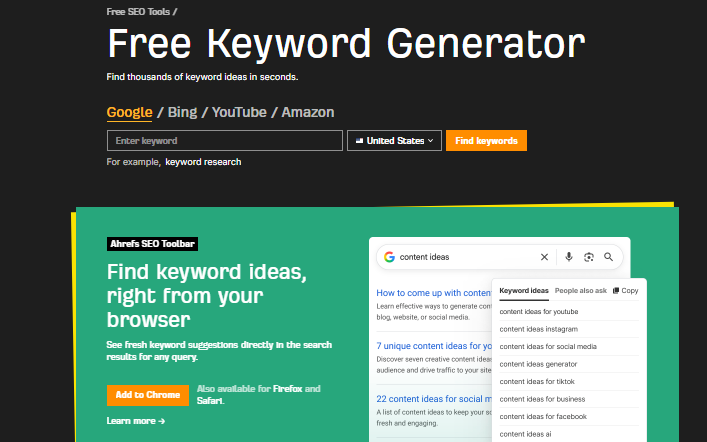
It’s a simple starting point for beginners to uncover potential search terms relevant to their content.
Step 2: Type Your Target Keyword
Next, enter the primary keyword you want to research. For example, if your topic is “travel tips,” type this into the tool so Ahrefs can find associated keywords that users frequently search.
Step 3: Choose Your Target Location Keyword
Select the geographic location for keyword research, such as the country or region you want to target. This helps you obtain search volume and competition data tailored to your target market, making your SEO strategy more localized and relevant.
Step 4: Click Find Keywords
Click the “Find Keywords” button to generate a list of relevant keywords with essential metrics like monthly search volume, keyword difficulty (how tough it is to rank), and potential click volume. This helps you evaluate which keywords have high potential and fit your SEO goals.
A Step-by-Step Guide to Using Ahrefs Keyword Explorer for SEO
To get the most out of Ahrefs, it helps to follow a clear process. Here’s a simple guide to using Keyword Explorer effectively.
Research The Topic
Begin by researching your topic to understand the industry, audience needs, and general keyword themes. This background knowledge will guide your keyword selection.
Start with the main keyword
Use a broad or “seed” keyword in Ahrefs Keyword Explorer as your starting point. This will help you discover related keywords, including long-tail variants that might be easier to rank for.
Analyze Metrics
Pay close attention to key metrics, including:
- Search volume: How many searches a keyword gets monthly.
- Keyword difficulty: The competitiveness of the keyword.
- Clicks: The potential number of clicks from ranking for the keyword.
Analyzing these helps you prioritize keywords that balance traffic potential with achievable ranking difficulty.
Export Keywords That Are Relevant to your Niche
Export the list of keywords that closely align with your niche or business area. This organized data can further inform your content calendar and SEO plan.
Use Keywords Competitors
Leverage Ahrefs’ competitor analysis features to see which keywords your competitors are ranking for. This can reveal untapped keyword opportunities or niches where you can compete strategically.
Monitor Keywords and Update Content
Keyword research is an ongoing process. Continuously monitor your keywords’ performance and update your content to keep it relevant and in line with search trends.
Ahrefs Pricing
Before deciding which plan to use, it’s important to understand the pricing options Ahrefs offers. Here are its pricing details:
Lite: $129/mo
Standard: $249/mo
Advanced: $449/mo
Enterprise: $1.499/mo
Benefits of Using Ahrefs Keyword Tool
Beyond keyword discovery, Ahrefs provides several advantages that can strengthen your overall SEO strategy. Here are some benefits of using Ahrefs keyword tool:
- Provides real search volume and competition data.
- Helps identify keywords competitors use.
- Offers insights into keyword difficulty and click potential.
- Facilitates export and organization of keyword data for efficient SEO planning.
- Supports ongoing monitoring to keep SEO efforts agile and up-to-date.
Google Keyword Planner vs Ahrefs: Which is Better?
Google Keyword Planner is free and useful for basic keyword volume data but lacks deeper competiton and click potential insights. Ahrefs provides a richer set of data, including metrics that help you understand keyword competitiveness and traffic potential. For beginners, combining both tools can be beneficial, but Ahrefs is generally better suited for more comprehensive SEO research.
Final Thoughts
Conducting keyword research with Ahrefs Keyword Explorer is essential for developing a strong SEO strategy. It helps you uncover keywords that your audience is actually searching for while giving you the data needed to prioritize efforts effectively. Remember, keyword research is iterative, keep analyzing, updating, and refining your keyword list over time. If you want expert help, consider consulting a reliable SEO service company to guide your efforts professionally.
This summary uses data from the references provided above to outline how to conduct keyword research using Ahrefs effectively. If you want a practical, data-driven approach to keyword research, Ahrefs is a powerful choice, especially when complemented with sound SEO principles.
Frequently Asked Questions (FAQs):
Yes, Ahrefs offers an easy-to-use interface with comprehensive data, suitable for beginners who want to learn in-depth keyword research.
Yes, you can start your research using the free Google Keyword Planner, but the results will not be as comprehensive as Ahrefs.
It is best to update your keyword research regularly, at least every 3-6 months or when there are changes in trends in your industry.
Use relevant keywords with good search volume to create content that addresses your audience’s needs and optimizes your website’s SEO.